A panel for Adobe Premiere Pro
Catch timeline mistakes before your client does.
PPROLint checks the active sequence while you edit: offline media, gaps, disabled clips, a shot scaled differently from the rest. Each problem says what was measured and why it was reported.
Premiere Pro 25.6 or later · macOS and Windows
Checking…5 problems
- Scale outliers00:00:20:00 · scale-outlier
- Audio level outliers00:00:20:00 · audio-level-outlier
- Disabled clips00:00:24:00 · no-disabled-clips
- Offline media00:00:30:00 · no-offline-media
- Video gaps00:00:50:00 · no-video-gaps
No AI.
PPROLint does not guess. Every rule is a written check with thresholds you can read and change. The same timeline gives the same result, every time.
Clip "A003.mov" on V1 is scaled to 130 %, 30 % larger than the median (100 %).
- Measured
- 130 %
- Threshold
- 10 % from the median
- Rule
- scale-outlier
Every problem explains itself
You see the measured value and the threshold behind each report, not a confidence score.
Your timeline stays on your computer
Checks run inside Premiere. Nothing is uploaded.
Unusual is not wrong
A clip louder than its neighbours may be intentional. PPROLint points at it; you decide.
Inside Premiere Pro.
A dockable panel next to your timeline. No export, no separate app: it reads the sequence you are editing.
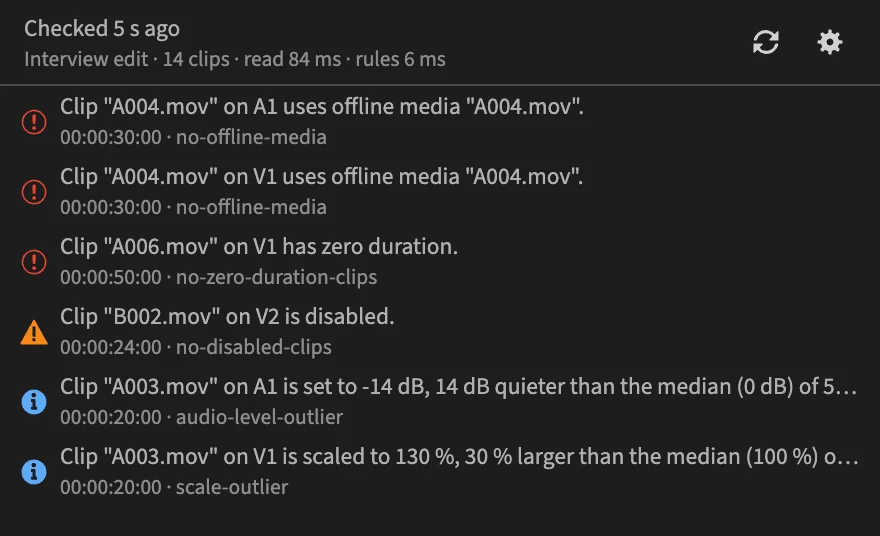
Click a problem, land on the clip
The playhead moves to the problem and the clips involved are selected.
Checks while you edit
The panel checks again every few seconds, or only when you ask.
Looks like Premiere
It follows Premiere's theme and speaks its language: English, Deutsch, Español, Français, Italiano, 日本語, 한국어, Português (Brasil), Русский, 简体中文.
How it works
- 1
Open a sequence
PPROLint reads the active sequence: tracks, clips, effects, audio levels and markers.
- 2
Read the problems
Errors, warnings and notes, each with its timecode and the rule that found it.
- 3
Jump to the clip
Click a problem to put the playhead on it, fix it, and watch it leave the list.
29 rules out of the box
Turn any of them off, or tune their thresholds to the way you work.
Technical checks
- Audio gaps
Reports ranges of the work area where no audio clip is audible.
- Clips outside the work area
Reports clips entirely before the sequence in point or after its out point.
- Disabled clips
Reports disabled clips, which are skipped on playback and export.
- Duplicate effects
Reports clips with the same effect applied more than once.
- Empty markers
Reports markers with neither a name nor a comment.
- Empty tracks
Reports tracks without clips.
- Invisible video clips
Reports video clips at 0 % opacity or 0 % scale, which render nothing.
- Markers outside the work area
Reports markers after the last clip or outside the sequence in/out range.
- Muted tracks
Reports muted tracks that carry clips, which are left out of the export.
- Offline media
Reports clips whose source media is offline.
- Out-of-sync audio and video
Reports audio clips offset from the video clip of the same source they play under.
- Partial adjustment layer coverage
Reports adjustment layers whose start or end falls inside a clip below them.
- Scale range
Reports video clips scaled outside the allowed range.
- Silent audio clips
Reports audio clips whose volume is set to silence.
- Subframe video edits
Reports clip edges and sequence in/out points that are not on a frame boundary.
- Tiny clips
Reports clips only a few frames long, usually leftovers of a trim.
- Video gaps
Reports ranges of the work area where no video clip is visible (black frames).
- Zero-duration clips
Reports clips whose end is not after their start.
Consistency between clips
- Audio level outliers
Reports audio clips whose volume setting is unusual compared with other clips.
- Duration outliers
Reports clips far longer or shorter than the other clips.
- Inconsistent effects
Reports clips missing an effect that most comparable clips have.
- Repeated footage
Reports clips that reuse a source range already used elsewhere in the sequence.
- Scale outliers
Reports video clips whose scale is unusual compared with other clips.
- Speed outliers
Reports clips whose speed is unusual compared with other clips.
Project conventions
- Required effects
Reports clips missing a configured effect.
- Required markers
Reports configured sequence markers that are missing.
- Required tracks
Reports a track layout that does not match the configured requirements.
- Restricted effects
Reports clips using a configured forbidden effect.
- Sequence settings
Reports a sequence whose frame rate or frame size is not an allowed one.
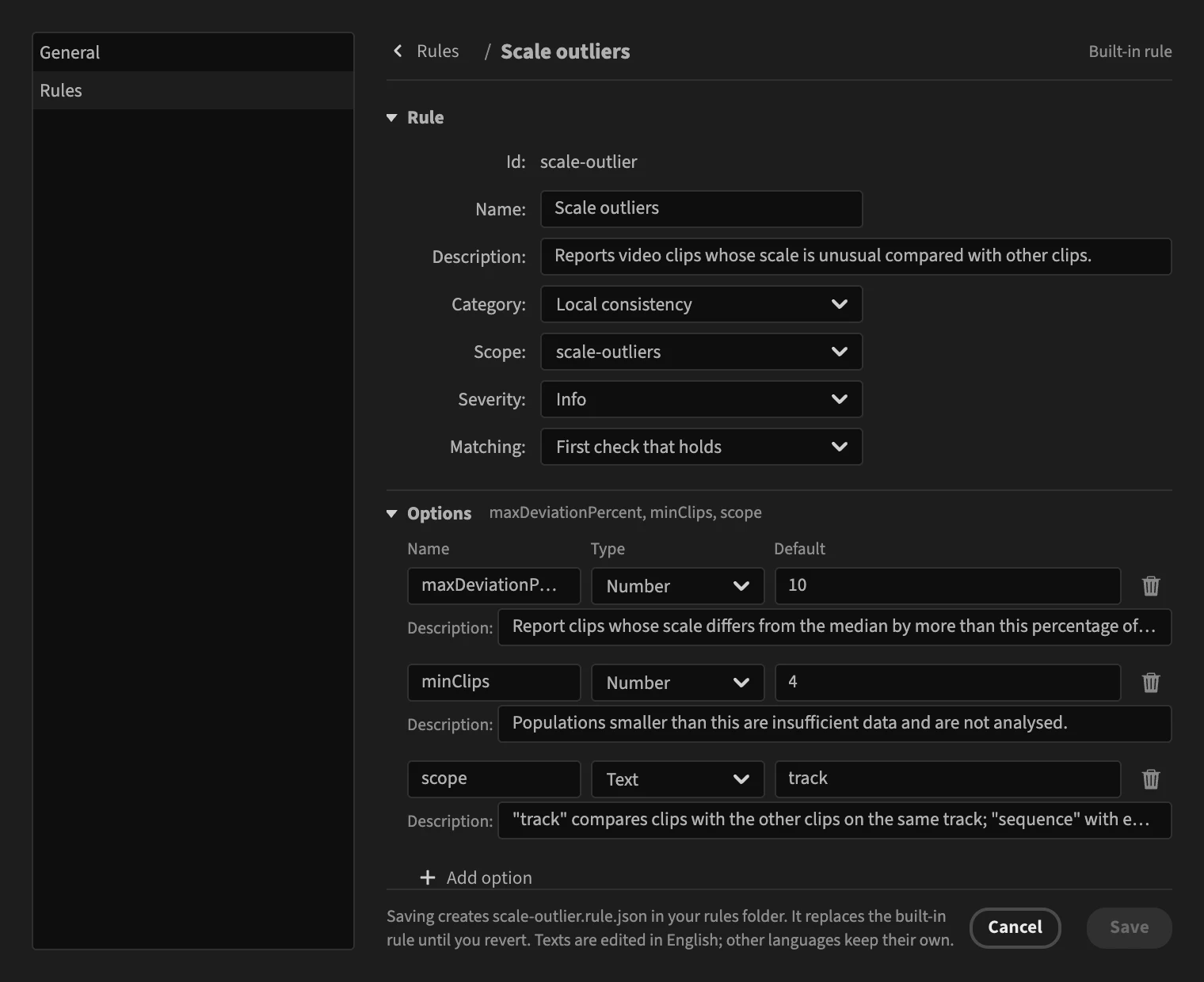
Write the rules your team follows.
Edit a built-in rule or start from scratch in a visual editor. Required markers, forbidden effects, track layout: describe your delivery spec once.
Rules are files
Each rule is a small JSON file. Share a folder with your team and everyone checks the same things.
Pay once. Try it first.
No subscription. PPROLint is sold on aescripts.com, which delivers it and manages your license.
Free for 7 days
Install PPROLint and start the trial from the panel's License Settings. Buy only if it earns its place in your workflow.
PPROLint license
€49
One-time payment
- Every built-in rule and the rule editor
- A free 7-day trial
- License managed from your aescripts account
Questions and answers
Does PPROLint use AI?
No. Every rule is a written check with thresholds you can read and change. The same timeline gives the same result every time, and no model guesses what is wrong.
Which versions of Premiere Pro does PPROLint support?
Premiere Pro 25.6 or later, on macOS and Windows. PPROLint is a panel inside Premiere: there is no export step and no separate application.
Does PPROLint upload my project or footage?
No. Checks run inside Premiere, on your computer. Your sequence and media never leave it, and the panel sends nothing to us. Only the license check goes to aescripts, who sells and licenses PPROLint.
Can PPROLint change my timeline?
No. PPROLint only reads the active sequence and reports what it finds. Clicking a problem moves the playhead and selects the clips involved; the fix is yours to make.
Can I write my own rules?
Yes. Each rule is a small JSON file. Build it in the visual rule editor inside the panel, or write it by hand following the documentation, then share the folder with your team.
Can I try PPROLint before buying?
Yes. Install it and start a free 7-day trial from the License Settings dialog in the panel. No purchase is needed to try it.
Where do I buy PPROLint and manage my license?
On aescripts.com. Your license is tied to your aescripts account: activate it from the panel's License Settings, and turn to aescripts to move it to another computer or to ask for a refund, under their policy.
How do I get help?
Write to support@pprolint.com for help with PPROLint itself. For license activation, purchases and refunds, aescripts support helps you from your aescripts account.
Check your next sequence.
Install the panel, start the free trial, open a sequence, and read what it finds.
Premiere Pro 25.6 or later · macOS and Windows